
Here at Isos, we've seen use cases for pretty much everything. One use case that has come up for both my clients and myself as an admin has been identifying all licensed or active users in Jira or Jira Service Management (JSM) in order to audit the instance, free up inactive licenses, or simply get a list of users for communications purposes. Whatever the reason, going through the list of users in the UI is clunky, so in this blog post I will show you how to quickly identify all licensed or active users using a simple Groovy script! To run it, just pull up a Groovy console in Jira (note that a Groovy console comes with some typical apps like JMWE and may not be available out-of-the-box).
Let's jump right into it!
|
import com.atlassian.jira.component.ComponentAccessor
import com.atlassian.jira.user.util.UserUtil
import com.atlassian.jira.application.ApplicationAuthorizationService
import com.atlassian.jira.application.ApplicationKeys
UserUtil userUtil = ComponentAccessor.getUserUtil()
def applicationAuthorizationService = ComponentAccessor.getComponent(ApplicationAuthorizationService)
def sb = new StringBuffer()
int licenses = 0
//iterate over all users
userUtil.getUsers().each{ u ->
//checks active and licensed for Jira Software app
if ((u.active) && (applicationAuthorizationService.canUseApplication(u, ApplicationKeys.SOFTWARE)))
{
sb.append(u.displayName + " : " + u.emailAddress + "\n")
licenses++
}
}
sb.append("TOTAL LICENSED USERS: " + licenses)
return sb.toString()
|
As you can see from the above, we use the UserUtil and applicationAuthorizationService from the Jira API to iterate over all users in the instance, checking if they are marked as active and have a Jira Software license. A sample of output from the script is shown below:
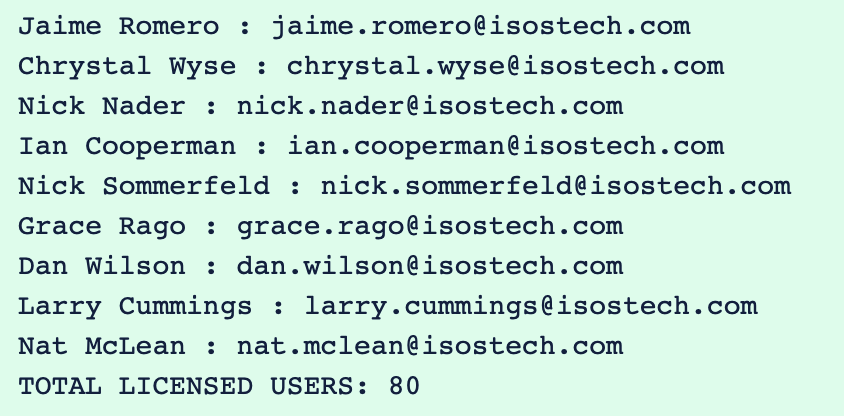
You can validate these results by first looking at User Management in the Jira UI and filtering by Active and Jira Software access:

As you can see, this returns the same results as the script!
Now, what if you want to check active and licensed users in JSM?
One simple change to the script will do!
|
import com.atlassian.jira.component.ComponentAccessor
import com.atlassian.jira.user.util.UserUtil
import com.atlassian.jira.application.ApplicationAuthorizationService
import com.atlassian.jira.application.ApplicationKeys
UserUtil userUtil = ComponentAccessor.getUserUtil()
def applicationAuthorizationService = ComponentAccessor.getComponent(ApplicationAuthorizationService)
def sb = new StringBuffer()
int licenses = 0
//iterate over all users
userUtil.getUsers().each{ u ->
//checks active and licensed for Jira Software app
if ((u.active) && (applicationAuthorizationService.canUseApplication(u, ApplicationKeys.SERVICE_DESK )))
{
sb.append(u.displayName + " : " + u.emailAddress + "\n")
licenses++
}
}
sb.append("TOTAL LICENSED USERS: " + licenses)
return sb.toString()
|
And voilà! It's as simple as that! I hope these script snippets can help speed your admin tasks or client needs. And as always, happy automating!

 Amanda Kirk


 Isos Technology
4 MIN READ
Isos Technology
4 MIN READ


